Monday, 2 August 2021

7 Easy Steps for Color Correction and Its Significance in Ecommerce

Once a pretty dress catches your eye, there's nothing that can stop you from adding it to the cart, and before you know it, it's on its way to delivery. This is the impact that product images have on customers. No matter how unique your product is or the variety of features it offers, it won't sell if it isn't presented well.
Product Color Correction

Color correction is one of the most important applications of photo editing to enhance images. Let's look at its importance in the e-commerce industry and how you can use color correction to revamp product images.

Significance of Color Correction in E-Commerce
  • Highlight Natural Beauty: Using raw pictures to sell products on e-commerce platforms isn't the best way to attract customers. The chances of selling a product that doesn't have a good product image are very low. But with the help of a photo editing agency, you can quickly improve the quality of the picture and boost sales. 
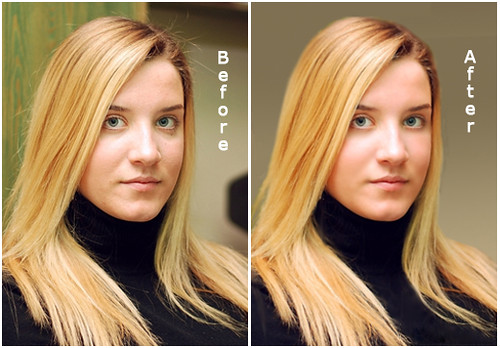
    Undivided Attention: Picking the right color and shade has a significant impact on the attention of customers. You can easily edit the product to offer various colors and skip spending time and money to shoot the same product in different shades. Human eyes are drawn towards color, and you can achieve the correct color combination with color correction.
  • Best-Quality Photos: A lot of factors influence the quality of product pictures. Imperfections due to camera equipment errors or damaged or broken products are possible. Any professional photo editing service can increase contrast, remove blurs, and enhance color to improve the overall quality and erase any flaws drastically. Color correction restores the original product color when a camera can't successfully capture the correct color of the product.

How to Color Correct Product Images?
  1. Open the Image: Press Ctrl+O, and select the image you want to edit.
  2. Create Path Layer: Select the background of the object to change the color of the product. This can be done by drawing a path layer. Expert editors create a new path layer over the existing layer to save the original one. To take a path layer for color correction, do the following:
    • Go to Path Tab
    • Click on the page icon at the bottom
    • A new path layer will be created to draw paths 
  3. Using the Pen Tool: You can find this tool in the toolbar with an icon pen icon and use it to draw paths more easily. Clicking 'P' on the keyboard will activate the pen tool as well.
  4. Draw the Path: Click one of the points on the product image and create anchor points to draw a path over the product with the mouse. Once you have traced a path, join the last point and the first point to create a full path that outlines the product.
  5. Select the Area: The selection step will assist you in making the desired alterations to the image. To do so, right-click on the path area on the image and opt for 'Make Selection' from the drop-down menu. Now you have selected the path area from the entire image.
  6. Choose the Hue and Saturation Layer: Using the 'Adjustment Layer', you can change the hue and saturation of the image for color correction. Go to the 'Adjustment Layer' menu on the bottom of the Layer Tab, and choose 'Hue and Saturation to change the product's color.
  7. Adjust the Hue and Saturation Layer: Change the color by moving the slider to choose the desired shade. First, change the hue to find the exact color and adjust the saturation to control the intensity of the color.
Beautiful, high-quality images have a strong impact on the customer's decision to purchase. You can improve your product images and boost sales by contacting Clipixie for professional photo editing services.

Monday, 26 July 2021

How Ghost Mannequin Photo Editing Services Benefits Fashion Apparel Stores

 If you are a business owner, you understand the need for exceptional quality images for online stores and business websites. Customers find it quite hard to shop online when they aren’t sure about the styling, fabric quality or how the product would look after wearing it. 


Ghost mannequin photo editing solves all those problems and provides a better perspective for viewing the apparel for an improved shopping experience. Here are some of its benefits for your fashion apparel store.


Top Benefits of Ghost Mannequin Photo Editing for Fashion Apparel Store


  1. Professional Product Images


Photo editing enhances the quality of the images and makes the colour pop out and be more visible. A high-quality image can add to the aesthetic appeal of the product and makes it more noticeable. During the editing process, unwanted mannequin backgrounds are also removed to give it a more professional look and focus entirely on the product.


  1. Better Presentation


As one of the most popular ways to enhance presentation, ghost mannequin has changed how business owners introduce their products in the e-commerce store. Ghost mannequin improves the overall image quality and provides a more professional result than its unedited counterpart. By making the product more attractive, the attention of the viewer is concentrated solely on the product.


  1. Cost-effective


In the long term, ghost mannequin saves cost by eliminating the need to hire multiple models to display the apparel. You can easily outsource photo editing services and get the work done by skilled professionals at a fraction of the cost. No maintenance cost is incurred, which adds more to your savings. It is an easy and affordable technique to attract customers and boost sales.


  1. Higher Clarity


Often customers find it difficult to view the product and get a better idea of its details and features. For apparel, this could mean the exact shade in the picture doesn’t match the product delivered, or the images available don’t provide enough clarity to visualise the product. Viewing a high-quality, professional product image can help determine if it will be a perfect fit and convince the customer to purchase it.


  1. Maintains Consistency


The competition in e-commerce is fierce, and small business owners can get an edge by presenting crystal clear, superior-quality product images. Ensure all the images put up on the platform are consistent in quality to provide a better customer experience and boost sales. 


  1. Improves Market Value:


Professional quality apparel photos can make your product stand out from the rest and attract customers’ attention. Enhanced product images help build a better brand reputation and increase engagement with your target audience and allow you to stay ahead of the competition.


Ghost mannequin is one of the most trending ways in which fashion e-commerce stores attract customers. To stay ahead of the competition, hire a photo editing agency that offers quick turnaround time and high-quality results. You can get in touch with Clipixie or easily upload the images on our website to effortlessly avail professional photo editing services.

Tuesday, 20 July 2021

8 Tips to Choose the Best Photo Retouching Services Provider

Finding a competent service provider, especially for photo editing, is a challenging task. Images play a significant role in online businesses, and you simply cannot do without them. Customers require a visual sample to compare with their expectations. Unlike honeyed words, pictures cannot easily lie, and you can pick out every single detail from a single image. 


However, photo editing and retouching services is a time-consuming task, one that requires a decent skill set. One solution to this is to outsource the service you need, but where do you start looking? First, let’s look at your options.


  • Intern: They will be less expensive but eager for work, and while they won’t have an abundance of experience, they can get the job done if you are in a pinch. 


  • Freelancer: A seasoned freelancer can vary in price depending on their level of expertise and quality of work. They might require a longer turnaround time because of other commitments and limited resources. An individual contractor may not be able to take up bulk orders either.


  • Agency: While more expensive, they can justify the cost with quick turnaround time, availability, professionalism and skill. 


What to look for in a Photo Retouching Company?

Experience: As a general rule, you don’t get photos retouched from newbies in the field. An experienced company provides information regarding their skills or shows samples of previous works with their past clients. 


Expertise: Figure out exactly which type of service you need because not all companies provide full area editing services. Some photo editing agencies are specialised in a particular field, so you can choose the right agency with experts in the area of service you are looking for. 


Data Security: Data is a valuable asset, and some people look for a service that can assure data security. Content confidentiality can be a concern for companies, so choose an agency that verifies security with ISO 9001 certification. If you are working with sensitive or personal material, only collaborate with an agency that offers data security.


Turnaround Time: Many people outsource service when they don’t have the time or the skills required. You may need your images edited in a short period to meet a deadline or just so you can get other work done instead. It is essential to ask how long it can take for an agency to deliver the results. A good image editing agency will get the job done fast and respond quickly to any emergencies.


Portfolio: Most companies display their portfolio on their website for prospective clients to view. Before choosing the right agency, it is necessary to look at their samples and get an idea of how they work and what kind of results you can expect from them.


Referrals: You can always ask for advice and opinions from others who have sought out a photo editing service before. Get a general idea of where you can find the best service and compile a list of recommendations that you can choose from.


Reviews: While many reviews may be fabricated, some sites offer genuine feedback that you can rely on. Past experiences of other people can help you determine whether it’s a good idea to get services from that particular agency. Look for authentic reviews by verified profiles and look for specific details that can offer insight.


Price: If an agency is boasting about super low costs for editing, you might want to be careful about the quality of work they would deliver as well. The cheapest is not always the best, but you shouldn’t go for the most expensive service. There are many factors to consider while checking the price, so it depends on what you are looking for.


There is a lot of information to process and many factors to consider before choosing the right image editing service. But, if you are in a rush and don’t have the time to comb through various agencies and pick out the best, go to Clipxie’s website and simply upload your image and your requirements. Our team of expert photo editors will deliver high-quality editing services that exceed your expectations, all within 24 hours.


Sunday, 11 July 2021

Product Photo Editing Services: Comprehensive Guide for Starters

 A picture is worth a thousand words, and this holds true for product photos where a customer's eye is drawn first to the image itself. Sometimes the product description alone is not enough to paint an accurate picture of what the product would look like, and the lack of a product image can lead to fallen expectations. 


Once a photograph is captured, it is rarely published straightaway. Modifications are required to achieve the perfect, professional look, and it takes a certain level of skill to do so. Let's look at some of the fundamental ways product images are edited to make products appealing and sellable.


  1. Background Removal: Most e-commerce websites call for the standard white background, and many times it's either shot in a coloured one or the clean white tone of the background is affected by light or shadows. Unnecessary props or unwanted objects can also distract the user's attention from the product.


  1. Colour Correction: Our eye colour corrects everything we see. The paper will look the same under the light of the lamp or in sunlight. In product photography, colour correction is required to alter the colour of the product in the shot to match it with its actual shade and get the most accurate colours out of an image.


  1. Photo Retouching: Many times, there are smudges, chips or cracks on the product which may have been overlooked. Retouching removes these imperfections and makes slight changes to the colour, shape and texture to increase aesthetic appeal and boost sales.


  1. Resizing and Cropping: Image resizing refers to changing the dimensions without altering the image itself, while cropping removes a portion during the process. It is done to adjust the frame and aspect ratio proportionally to meet the client's demands.


  1. Straightening: Aligning the picture into a rectangular frame by adjusting its dominant vertical and horizontal lines are called straightening. The process helps change bent or curved images and improve perspective by producing a visually pleasing, balanced result.


  1. Photo Manipulation: Unlike the name suggests, manipulation is not used to deceive customers but only make acceptable modifications to customise the image and achieve better results. Some are considered to be skilled artwork, while other practices are unethical and deceiving. Accepted principles include adding shadows, blending colours, changing textures and combining multiple images. 


  1. Sharpening: It is an enhancement technique used to highlight edges and fine details and is used in various industries to increase an image's local contrast and sharpness. You can achieve a sharper image by adding acutance and edge contrast and overcome blurring introduced by camera equipment.


  1. Image Masking: You can modify certain areas of an image to hide some portions and reveal others by protecting the area with a masking tool while altering the rest. This is used to modify complicated pictures and remove the background non-destructively.


  1. Colour Changing: Also known as hue shifting, it is a technique that allows changing the colour of the product to a different shade and is not meant to deceive customers. It is a cost-effective way to showcase different colours of the same product and saves time by eliminating the need to shoot multiple product colour variations.


At Clipixie, we offer all the services mentioned above and more. For high-quality e-commerce product photo editing, you can contact us or visit our website and upload your images. Our team of expert photo editors will provide tailored solutions to all your specific requirements and deliver the results within 24 hours.

Monday, 5 July 2021

7 Mistakes You Need to Avoid in Jewelry Product Photography

 Too many product images are similar, making it hard to distinguish between each brand. If you want to catch the customer’s eye, make sure you offer something unique- the first glimpse of your product should draw them your way. 


When it comes to jewellery, the exact tone of the metal, the colour of the gems, and the design’s preciseness- everything matters. Of course, you can always avail photo editing services for post-production, but here are a few pointers you can keep in mind to save time and effort.  


  1. Unprepared merchandise: Most imperfections can be removed by advanced editing in post-production, but it is time-consuming and requires some nifty skills. It is better and easier to remove all tags and stickers from your product before photographing it. Also, remove any smudges and repair missing stones, gems or broken chains because cloning isn’t as easy as it looks, and you want to avoid reshooting. 


  1. Inconsistency: Make sure your product photos are consistently edited. Otherwise, it can confuse and distract customers and lower the professional appearance of your website. Don’t change the template of the pictures for the same product. Maintain the same background, cropping, sizing, and lighting to ensure all images are edited in the same style.


  1. Complex Background: To let your product take the spotlight, keep the background light. Having a plain background is better because white backgrounds are accessible, easy and make the product details starkly visible. There is a reason why Amazon, eBay, and other marketplaces require or recommend a white background. 


  1. Unnecessary Props: Don’t worry about props, mannequins or live models. It only tends to distract customers from the product. You need to keep the product in the spotlight, and that means doing away with unnecessary props. It might seem like a better option, but keep it simple and clean, so your jewellery shines, and the entire product is visible. 


  1. Inaccurate White Balance: You can have two completely different and contrasting images featuring the same product. In one picture, a gold-toned necklace may seem tarnished and yellow, while in the other, the shiny gold necklace appears to have a slightly blue tinge. The difference lies in the lighting and the white balance of the background. You can set your camera to ‘auto’ white balance mode, allowing it to adjust depending on the light source and capture colours accurately.


  1.  Harsh lighting: Lighting is an essential aspect of photography, and direct light can cause contrast and add shadows and reflections in your shots. These inconveniences can expose flaws in your product that may not be easy to fix. Use soft, natural light for your product photos and learn your camera’s manual mode so you can comfortably control how much light your camera pulls in during clicks.


  1. Poor Focus: A tripod is an absolute essential. If you want to avoid shaky, blurry pictures, you need to stop holding the camera or phone in your hand while shooting. Also, don’t take low aperture pictures focused on just one part of the product, leaving the rest of it blurred. You need to capture all the details on the product with a sharp focus to see everything the product has to offer. 


If you don’t have the time or the skills to touch up your product photos, consider hiring an agency with experience in e-commerce product photo editing. You can get in touch with Clipixie for unique tailored services and quick turnaround. All you need to do is upload your images on our website, and that’s it! We’ll take it on from there and deliver the best, high-quality results.

Wednesday, 30 June 2021

7 Basic Tips for Professional Photo Retouching

 Photography doesn't just start and end with taking a picture. Even though it takes a lot of effort to capture the right image, photo editing plays a huge role in creating the perfect final result, which is why you should collaborate with the best photo editing agency

Photo Editing Services India


Editing is where you alter the picture, manipulate the features, focus on the subject and highlight certain aspects you want to emphasise. Let's take a peek at some of the tips for editing your photos.


  1. Capture Interesting Lighting


Proper lighting is perhaps the most important factor in photography. A professional photographer will obsess about the lighting and often carry one of their own as part of their equipment. Using a broad source of light will soften its illumination on the subject. Also, the shadows created can be manipulated to give a three-dimensional look.


  1. Remove Aberrations


If the focus on an image is disturbed by any irrelevant objects, remove them out of the frame, or you can send them to a photo editing company to erase them without a trace. The clone stamp tool in Photoshop lets you copy pixels from one part of the image to another. This way, you can remove unwanted objects in the background.


  1. Focus on Subject


You don't have to be an expert in photography to know that some subjects are more interesting than others. But remember, an interesting subject does not make an interesting photo. While the subject is the main focus, it's not all that makes up an image. 


  1. Unique Perspective


A unique perspective can highlight your subject when you capture an image. Playing with different angles can create a result that draws a person's eye and evokes emotion. Changing the normal perspective in your photography can take your captured results to a whole new level. There are five types of perspective in photography:


  • Linear Perspective

  • Diminishing Scale Perspective

  • Forced Perspective

  • Aerial Perspective

  • Overlap


  1. Depth of Field


Beginners can control the depth of field by changing the aperture. A wider aperture can produce a shallower depth of field and vice versa. The photo's subject is sharp in a shallow depth of field, and the background is blurry. To capture sharpness, you should use a narrow aperture. 


  1. Mood 


Setting the right tone for the photo will assist you in conveying emotion. Like any work of art, emotion is a part of photography. Every picture tells a story, and the mood it displays exerts an emphasis on the emotion. Changing certain aspects of the photo can make a difference in the mood set. If you think this is too much work, outsource image editing services from a professional agency. They will establish a mood that aligns with the emotion you want to evoke from the viewer.


  1. Exposure


The overall darkness or lightness in a photo is known as exposure. The more exposure your camera gets, the lighter your photo will be. The features that control exposure are:


  • Shutter speed: It is the amount of time your camera takes to click a picture. The maximum duration in most cameras is 30 seconds. Some cameras have time modes to capture even longer.

  • Aperture: The function of aperture is similar to that of a human pupil. It can open and shrink to control the amount of light let through the lens. 

  • ISO: It's not a part of luminous exposure, and it does not affect the amount of light that reaches the camera's sensor. The brightening effect happens in-camera after the sensor has been exposed to the light.


You don't have to worry about changing all the features available in the software every time you edit a picture. The fundamental principle of good editing is that you don't take away any qualities from the image, only highlight or add to existing ones. An expert editor will know this and more.


Do you need to get photos retouched immediately? You can send professional or amateur photos to Clipixie, where our team of experts can provide the best photo editing services tailored to your specific needs.


Watch Your Real Estate Business Grow with Professional Photo Editing

  The demand for land and property has increased, making the real estate market extremely competitive. Every owner of a real estate company,...